Affiliate disclosure: Some links in this article are paid (affiliate) links. If you sign up or buy through them, ProDevs earns a commission. If you become a DigitalOcean customer through our link, we may earn a commission. Details: /advertise/
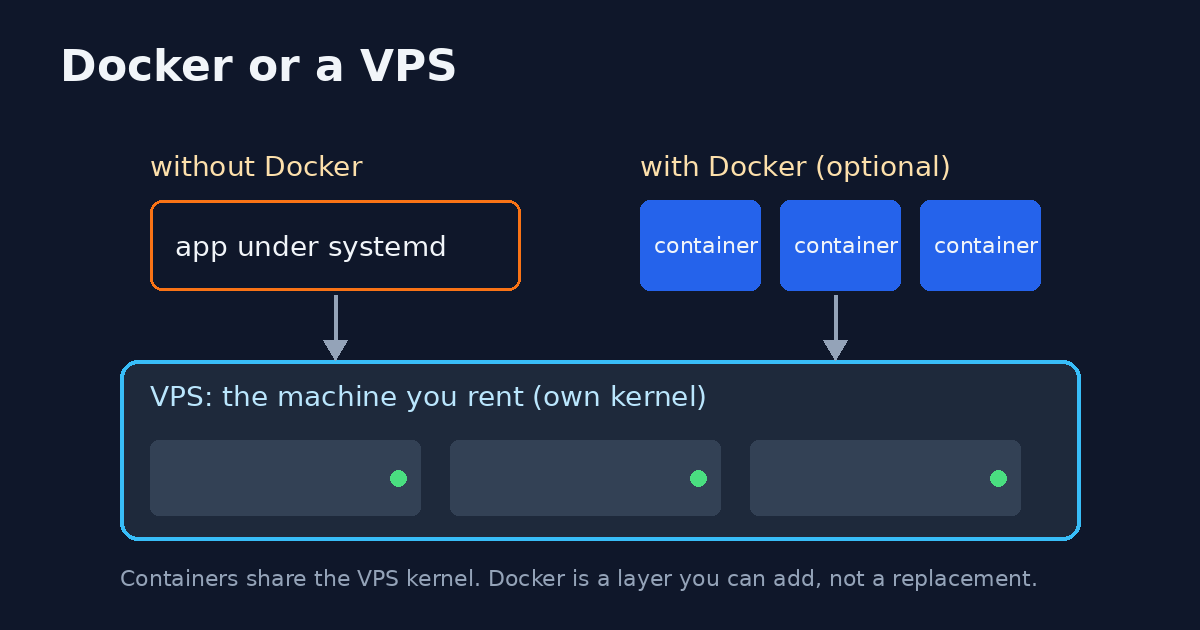
Cloudflare and a VPS are not substitutes, and the failure mode is paying for the wrong one. A VPS, in this article, means a virtual machine you rent and keep running.
By ProDevs
Published 2026-09-29
Last updated 2026-09-29.
Who this is for: Developers · Intermediate · You’ll need: one app you have deployed once, and a choice between a Cloudflare bill, a VPS bill, or both
AI disclosure: This was drafted with AI assistance.
Short answer
Cloudflare in front of that machine is a network layer. Workers is short request code, with a 128 MB memory cap per isolate on both the Free and Paid plans. (Workers limits)
Buy a VPS when a process must stay running between requests. Buy Workers when each request is short and you accept the plan’s CPU cap: 10 ms on Free, and on Paid a default of 30 seconds that you can raise to 5 minutes. (Workers limits) Use both when the app needs a real origin and you still want cache, TLS, and an origin address that DNS does not hand out. (proxy status docs) Cloudflare Tunnel does not replace the machine. A daemon you run, cloudflared, opens an outbound connection from that machine. (Tunnel docs)
Limit and price numbers below are copied from Cloudflare’s docs on 29 September 2026. The timing section is a measurement from a VPS we run, taken the same day. This article does not print a VPS price and does not pick a dollar winner.
Contabo. When the choice is to rent the machine, start from the VPS page (paid link). This article still does not print a VPS price and does not pick a winner.
DigitalOcean. When the choice is a Droplet, start from Droplet pricing (paid link). This article still does not print a VPS price and does not pick a winner.
How we test: limits and prices are read from Cloudflare’s own docs on the date above, and linked where they are used. The timings are our own cold HTTPS requests from two clients in India to a VPS we run, taken on 29 September 2026. The method and raw medians are in the measured section below.
Who it’s for
You can SSH, you have shipped something once, and you are about to pay Cloudflare, a VPS provider, or both. The choice changes the invoice and who gets the page at 3 a.m.
Not for
This page is not a Cloudflare product tour, a coupon list, or a ranking of VPS hosts. It is also not a Containers tutorial. Containers are named so you do not treat a beta-era blog post as current.
Three products
| Product | What it runs | What the docs say about idle | Who owns the host | Quiet month, in shape |
|---|---|---|---|---|
| Proxy and DNS | Nothing of yours. It sits in front of an origin. (proxy status docs) | The origin is still yours. | You, on the origin. | The origin’s flat bill. No zone price is copied here. |
| Workers | Your request handler. One isolate can serve many requests, and the cap is 128 MB. (Workers limits) | Free accounts stop at 100,000 requests a day. (Workers limits) | The caps in the limits table are CPU, memory, and duration. (Workers limits) | Free, inside those caps, or Paid from a $5 USD monthly minimum. (Workers pricing) |
| VPS | A virtual machine you keep. This row is the article’s definition, not a Cloudflare spec. | The machine stays on the invoice. | You. | A flat monthly machine. The dollar amount is not in this article. |
| Containers | A container image, started on demand by Worker code, on the Paid plan. (Containers GA changelog, Containers docs) | The starter sample sets sleepAfter to 10 minutes. That line is sample code, not a limit from the limits table. (Containers docs) |
You configure the image. The Worker starts instances on demand. (Containers docs) | Paid plan. No per-instance dollar rate is copied here. |
Containers have been generally available since 13 April 2026. (Containers GA changelog) They are not the default in the decision below. The default split is still proxy, Workers, and a VPS.
Decision
Walk the questions in order.
Must a process stay alive when no request is in flight? A queue worker, a bot, a database on that same machine, or a cron that is not a short scheduled function belongs on a VPS. A Workers Cron Trigger is an invocation with a wall-time cap of 15 minutes, not a process that waits between runs. (Workers limits) On the Free plan that invocation also has a 10 ms CPU cap. On Paid, a Cron Trigger gets 30 seconds of CPU when the interval is under an hour, and 15 minutes of CPU when the interval is an hour or more. (Workers limits) Free accounts can have 5 Cron Triggers. Paid accounts can have 250. (Workers limits)
Is every request short, stateless, and inside the CPU and memory caps? Workers can be the whole app. Memory is 128 MB per isolate on Free and on Paid. The isolate is shared by concurrent requests. Crossing 128 MB returns error 1102. (Workers limits) Crossing the CPU cap returns the same error 1102, with invocation outcome exceededCpu. (Workers limits) HTTP wall time has no hard limit while the client stays connected. waitUntil() can keep working for up to 30 seconds after the response is sent or the client disconnects. (Workers limits) A WebSocket to a Worker is billed as the opening Upgrade request. Later messages are not extra requests. (Workers pricing) That is not a process that keeps running after everyone disconnects.
Do you already need the VPS, and you also want cache, TLS, or a hidden origin address? Put Cloudflare in front. Do not throw the VPS away. A proxied A, AAAA, or CNAME record is the orange-cloud state. DNS answers with Cloudflare anycast addresses, not the origin address in the record. A DNS-only record answers with the origin address. (proxy status docs)
Do you need the box reachable without an inbound port? Tunnel is a feature on top of a machine you run. cloudflared makes outbound-only connections from your infrastructure. You can then block inbound traffic. (Tunnel docs) The tunnel is not itself a VPS.
Measured from a VPS we run
On 29 September 2026, at 18:31 IST, a client in India sent 8 cold HTTPS requests to each URL below. A cold request is a new connection, so DNS, TCP, and TLS sit inside the time. A second client in India used the same method. The VPS we run timed the same URLs. We did not put Cloudflare in front of that VPS. The public A record is the machine. Responses from our hostnames had no cf-ray header. The Cloudflare rows are a public edge, 1.1.1.1 and www.cloudflare.com, not a proxied name of ours.
| From | URL | Median time to first byte |
|---|---|---|
| Client in India | news.prodevs.in/robots.txt, 241 bytes, bare VPS |
656 ms |
| Same client | 1.1.1.1/cdn-cgi/trace, colo CCU |
44 ms |
| Second client in India | news.prodevs.in/robots.txt |
644 ms |
| Second client in India | 1.1.1.1/cdn-cgi/trace, colo CCU |
43 ms |
| Client in India | www.cloudflare.com/cdn-cgi/trace, colo MAA |
177 ms |
| Second client in India | www.cloudflare.com/cdn-cgi/trace, colo MAA |
97 ms |
| The VPS | its own 241-byte file, via the public name | 57 ms |
| The VPS | www.cloudflare.com/cdn-cgi/trace, colo FRA |
65 ms |
| The VPS | 1.1.1.1/cdn-cgi/trace, colo FRA |
55 ms |
www.cloudflare.com was slower than 1.1.1.1 from India. Those are two edges. This article does not merge them into one Cloudflare figure.
The home page was 257415 bytes. From the first client in India, median time to first byte was 591 ms and median full download was 1350 ms. On the VPS, median full download of that page was 52 ms, and time after TLS was 2.3 ms. That sample used the public name. The same page through the local address was 4.3 ms after TLS. From India, time after TLS was about 190–220 ms, close to the TCP connect time. The wait is the path to one origin.
159 of 159 responses were HTTP 200. None was 524, 522, or 523. None stopped on a 25 second client timeout. A 524 did not appear. We did not reproduce one, because nothing we queried is behind Cloudflare. Cloudflare’s docs still say a slow origin can return a 524, and this article still does not copy a timeout length. (proxy status docs)
What breaks at 3 a.m.
On a VPS you patch, you fill the disk, and the bill stays flat whether the night is quiet or not. Ordinary Linux software is available because you picked the image.
On Workers the published caps are CPU, memory, and duration. You do hit those caps. (Workers limits) The Free plan allows 100,000 requests a day, resetting at midnight UTC. Past that, Cloudflare returns error 1027. Fail open bypasses the Worker. Fail closed returns the 1027 page. (Workers limits) The limits table says Paid has no request cap. The pricing page, updated 28 August 2026, says something narrower: 10 million requests included each month, then $0.30 per extra million. (Workers limits, Workers pricing) Read both before you plan a launch. CPU time does not include waiting on fetch(). Cloudflare’s own limits page says the average Worker uses about 2.2 ms of CPU, and that heavier work such as auth or server-side rendering often uses 10–20 ms. (Workers limits) That is their figure, not a measurement from this article.
Proxy-only fails with the origin. If the origin does not send an HTTP response within the proxy read timeout, Cloudflare returns a 524. The timeout length is not copied here. The measurement above did not observe a 524, a 522, or a 523. (proxy status docs)
Containers add a Linux-like environment and a full filesystem, on the Paid plan, started on demand by your Worker. (Containers docs) The published instance types run from lite (1/16 vCPU, 256 MiB, 2 GB disk) through standard-4 (4 vCPU, 12 GiB, 20 GB disk). Custom sizes start at 1 vCPU. The 1 vCPU floor does not apply to lite or basic. Custom memory tops out at 12 GiB and custom disk at 20 GB. (Containers limits) The docs also list SSH to a running instance through Wrangler. (Containers docs) That line is the docs index, not a copy-paste SSH guide.
A sane default
For a small app that has a database and a worker process: one small VPS, Cloudflare proxy in front, and an origin firewall that accepts HTTP and HTTPS only from Cloudflare’s published ranges. Cloudflare’s IP page shows an allow rule per range and then a drop for other HTTP and HTTPS. Follow that page on the day you apply it. This article does not paste a ruleset. (Cloudflare IP ranges) Keep long jobs on the VPS. Add a Worker for a redirect, a webhook, or a cache edge when that request fits the caps. Do not start with a rewrite onto Workers.
How large the origin should be is a different article: VPS for AI coding agents. That URL was live on 29 September 2026. The /tutorials/ path redirects to /tools/.
Workloads that pick a side
Use a VPS for a coding-agent box, a self-hosted CI runner, a Docker Compose app, or Postgres on that same machine. The runner case is the long-running Linux job in what self-hosted GitHub runners cost. That URL returned HTTP 200 on 29 September 2026. One sentence there is enough. The agent case is the same shape: the process has to stay up after you close the laptop. Sizing it is the other article, linked above.
Use Workers for a webhook receiver, a redirect, or a low-traffic site that fits 100,000 requests a day and 10 ms of CPU on Free. (Workers limits) If the work needs more CPU than 10 ms and you are willing to pay, the Paid default is 30 seconds, with a ceiling of 5 minutes and 30 million CPU milliseconds included per month. (Workers pricing)
Use both for the app in the default above: the VPS holds the database and the long jobs, and the proxy hides the origin address. (proxy status docs, Cloudflare IP ranges)
If that VPS is where you will live in SSH, for an agent box, a runner, or Compose, Talk2Term is a free daily shell companion. The homepage, read on 29 September 2026, says 20 Lite requests a day, and that the assistant explains the command and does not type it. (Talk2Term) It is not Cloudflare, it is not a VPS, and it is not the coding agent.
The zsh plugin is zsh-talk2term. Install it once if you want t2t in your own shell. The plugin is not required for the decision above.
Costs without a fake calculator
Workers Free is the default plan. It includes 100,000 requests a day and 10 ms of CPU per invocation, and it does not charge for duration. (Workers pricing) Workers Paid adds a minimum charge of $5 USD per month. Included usage on that plan is 10 million requests and 30 million CPU milliseconds. Extra requests are $0.30 per million. Extra CPU time is $0.02 per million CPU milliseconds. (Workers pricing) There is no duration charge on either plan. (Workers pricing)
A VPS does not get cheaper on a quiet night. The machine bill is flat. Heavy steady CPU often fits that flat bill better than a metered CPU millisecond price. Spiky, low-CPU traffic often fits Workers Free, until you cross 100,000 requests in a UTC day or 10 ms of CPU on a single invocation. (Workers limits) This article does not convert those dollars to rupees and does not subtract a VPS invoice from the $5 minimum. Those are different products.
Containers do not change that shape into a VPS. They require the Paid plan, and this article does not copy a per-instance price. (Containers docs)
What not to migrate
Do not move a long-running agent or a self-hosted runner onto Workers. The Free CPU cap is 10 ms per invocation, and a Cron Trigger still ends. (Workers limits) Do not put the only copy of a database on the Workers isolate to avoid learning Postgres. The isolate cap is 128 MB, and the limits page tells you to put large data in KV, R2, or D1 instead of holding it in the isolate. (Workers limits) Those stores are not a Postgres server on the box.
Do not open the VPS to the whole internet and also turn on the proxy. A proxied name hides the origin address in DNS. Anyone who already has the address, from old DNS or from mail, can still connect directly. The IP page says to block HTTP and HTTPS that does not come from Cloudflare ranges. (proxy status docs, Cloudflare IP ranges)
Do not treat Containers as the VPS you already know how to administer. They are generally available, they run an image, and the largest published type has 4 vCPU, 12 GiB of memory, and 20 GB of disk. (Containers GA changelog, Containers limits) A disk or a lifecycle you need beyond that table is a reason to keep the VPS.
Alternatives
The alternative to Workers is a VPS when the process must outlive the request. The alternative to a public origin address is the orange-cloud proxy, or Tunnel if you can close inbound ports. (proxy status docs, Tunnel docs) The alternative to rewriting a Compose app onto Workers is leaving it on the VPS and putting the proxy in front. Containers are the alternative only when you already pay for Workers and the image fits an instance type in the table above. (Containers docs, Containers limits)
Cons
Workers Free will fail a request that needs more than 10 ms of CPU, and it will fail the day with error 1027 after 100,000 requests. (Workers limits) Paid removes that daily request wall on the limits table and replaces it with a meter on the pricing page. (Workers limits, Workers pricing) The isolate cap is still 128 MB. (Workers limits)
A VPS stays up when you are asleep, which is the point, and it also stays on the invoice. You patch it. A full disk is yours.
Proxy without an origin firewall looks protected and is not, once the origin address leaks. (Cloudflare IP ranges) Tunnel without a machine at the end does not exist: cloudflared has to run somewhere you control. (Tunnel docs)
Containers add an image and the instance limits in the table above. The docs list SSH through Wrangler. (Containers docs)
FAQ
Is Cloudflare a VPS?
No. This article uses VPS for a virtual machine you rent and keep running. Cloudflare in front of that machine is a network layer. Workers is request code at the edge, with a 128 MB memory cap per isolate. (Workers limits)
Is Cloudflare Workers cheaper than a VPS?
Only after you know the request shape. The Free plan includes 100,000 requests a day and 10 ms of CPU time per invocation. The Paid plan has a $5 USD monthly minimum. A VPS is a flat machine bill. This article does not name a dollar winner. (Workers limits, Workers pricing)
Can I use Cloudflare and a VPS together?
Yes. Proxy the DNS record when the app needs a real origin and you still want cache, TLS, and a hidden origin address. Then allow only Cloudflare’s published IP ranges to reach HTTP and HTTPS on that origin. (proxy status docs, Cloudflare IP ranges)
Does Cloudflare Tunnel replace a VPS?
No. cloudflared runs in infrastructure you already have and opens an outbound connection. The tunnel ends at that machine. (Tunnel docs)
Where do AI coding agents fit?
On the VPS, when the agent process has to stay up between requests. Workers Free stops an HTTP invocation at 10 ms of CPU time. (Workers limits) Containers are a separate Paid-plan product, not the default agent box. (Containers docs) Size the VPS in VPS for AI coding agents.
Need the origin set up?
The public services list is technical writing, DevOps and CI setup (including self-hosted GitHub Actions runners), and developer content. There is no rate card. Tell us what is running, whether it has to stay up, and the timeline.
Scope is on the services page.